
-
Please be sure to read the troubleshooting guidelines and the General FAQ before creating a thread.
Please also be sure to see related threads to your issue, a solution may already exist.
You are using an out of date browser. It may not display this or other websites correctly.
You should upgrade or use an alternative browser.
You should upgrade or use an alternative browser.
How do I set up the Discord Rich Presence for RoR?
- Thread starter RigRodder
- Start date
- Status
- Not open for further replies.
Solution

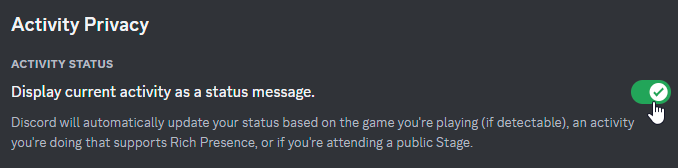
Discord Settings -> Activity Privacy:
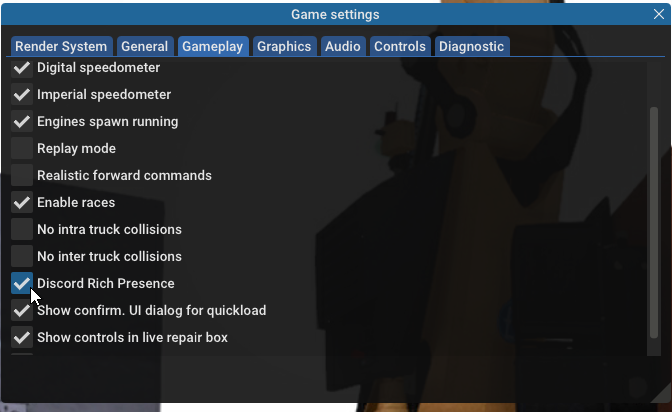
In RoR, enable rich presence in Settings -> Gameplay:
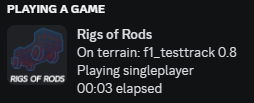
Restart the game after enabling. It should now activate when a terrain is loaded:
In RoR, enable rich presence in Settings -> Gameplay:
Restart the game after enabling. It should now activate when a terrain is loaded:

Discord Settings -> Activity Privacy:
In RoR, enable rich presence in Settings -> Gameplay:
Restart the game after enabling. It should now activate when a terrain is loaded:
In RoR, enable rich presence in Settings -> Gameplay:
Restart the game after enabling. It should now activate when a terrain is loaded:
Last edited:

PISK
i think, i thought i saw you try
But i'm using official Discord client, on Windows
Może nie działać z niezgodną przeglądarką
OP
OP

RigRodder
Number 1 Pickup Enjoyer.
Huh, we have different situations then. You're using the application while I'm using the browser version.But i'm using official Discord client, on Windows
- Status
- Not open for further replies.